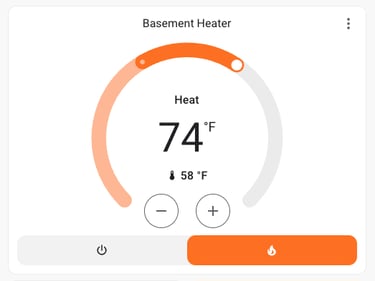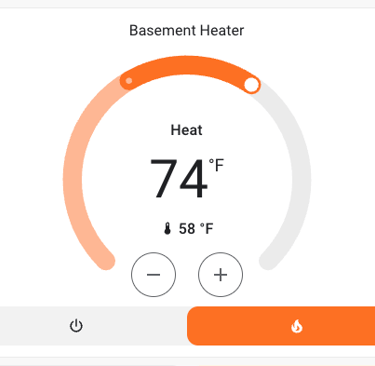
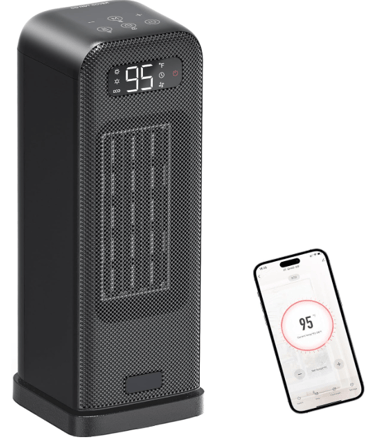
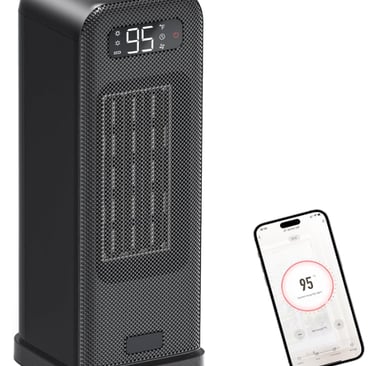
Morento Smart Space Heater with Tuya Local Control in Home Assistant
A review of the Morento Smart Space Heater and brief explanation how to control it without the cloud.
REVIEWSGENERAL BLOG
1/21/20264 min read
Stay Safe
Just to get the safety info out in the beginning, use any of these products at your own risk, I trust products like this as far as I can throw them, you should never use a space heater without keeping an eye on it. It's always advised to not use extension cords with space heaters, every connection you make along the way is going to get hot while these heaters run and if you use an extension cord, you're depending on it to hold up against hours of being hot each day, they can catch fire. I am lucky to have a 20 Amp power outlet pretty close to where I want to use my space heater, so there's more than enough capacity to handle it, I found this unit draws more power than the Amazon listing claims, so make sure your circuit and everything along the way can handle close to 15Amps of draw.
Why I Purchased
Work in an unfinished basement and my space heater died.
Wanted a space heater that I could heat up my little work space ahead of time, most space heaters prevent a smart switch from turning them on if you turn the smart switch on.
Wanted something that worked with my Home Assistant setup, leaning on Amazon's return policy I rolled the dice to see if I could get it to work with Tuya Local, I've had good luck in the past.
Tried an oil filled heater than did almost nothing, needed more directional heat.
Features
Connects to your wifi allowing you to control it through the app the tell you to use, or personally I set it up using the Tuya App. (I don't understand why the don't just all use the Tuya app, the dozens, if not hundreds of Smart Home apps that are just Tuya with face paint on is just a strange, tone deaf marketing strategy.)
Can oscillate, at first I didn't like this, but some times instead of turning the heat down it's nicer to let it oscillate and spread the heat out a bit more.
Has a thermostat function that can reduce or stop heating if it goes above what you set.
You can set timers if you'd like, but I prefer to just turn it on a little bit ahead of time to be more in control of it's use.
I can confirm it can operate locally with Home Assistant, it's not officially supported, so this always subject to the manufacturer or Tuya somehow breaking this connection method.
Pros
Really good heat output.
Can be started remotely to warm up your space ahead of time (use with caution).
Works with Tuya Local, a custom component for bringing in Tuya devices into Home Assistant.
Cons
Draws a bit more than the 1500watts it's "supposed to". This might be why it's able to put out some really solid heat, but it might cause safety/tripping issues with some users.
They way companies that use Tuya's backend is really confusing for average consumers, why not just have one Tuya app?
Controlling Your Heater with Tuya Local in Home Assistant
Why do this? Home Assistant has a cloud dependent Tuya integration that is written by Tuya themselves, so if you're ok with depending on the cloud then by all means, try that out, I dislike the idea of depending on the cloud.
Why integrate this with Home Assistant? If you don't care if it's in Home Assistant, don't bother, the cloud based Tuya app worked fine enough for me while I was getting things set up. I just want a single app experience, I don't have to figure out which app to open, it's always just Home Assistant. Plus I could automate it to turn on in my automation engine of choice once I trust the device, I can remind myself if I leave it on by accident as well.
Requirements:
Home Assistant
The device set up in the Tuya app, if you set it up in the app it recommends you might want to remove it and move it over to Tuya, I just keep them all in there to keep it simple.
HACS (One day I'll write an article on HACS, but for now you're on your own)
Tuya Local Custom Component through HACS
Go through the steps of enrolling in the Tuya Developer Program (another step that Tuya should eliminate, they need to allow users to locally control their devices without having to pretend to be a developer looking to make a product that works with Tuya)
Step by Step
In Devices in Home Assistant go into Tuya Local (already configured)
Add device, it will ask for your user code (this is found in the Tuya app under settings)
It will ask you to scan the barcode on the Home Assistant page (in the Tuya app there's a little barcode scan icon you need to click [--]
It should ask you to log into Tuya on your web browser, after you do it asks if you trust Home Assistant, then Tuya Local should bring in any devices you have in Tuya that aren't registered.
When it asks the device type I had to change it to one called "princess panel", that was the option that enabled the thermostat to work properly in Home Assistant, the default only really allowed on/off functionality.
Final Thoughts
Overall, the Morento Smart Space Heater is an excellent choice for anyone seeking good heat output and convenience. With its easy control features, especially through Tuya Local in Home Assistant. Great for a small work-from-home space, but not a big open one, I don't think any space heater can really achieve that.
Links
Amazon Affiliate Link (Helps me a tiny bit maybe? I don't know):https://amzn.to/3LNXlKF
Amazon Regular Link (Doesn't help :-)): https://a.co/d/iPZwEPP